Jupyter AI
the Python 3.13 environment supports juypter-ai. It requires a few configurations to work properly with providers, in particular with custom providers like the DESY assistant or BlaBlaDor.
Note:
- access to the DESY assistant is currently limited to DESY staff
- access to BlaBlaDor requires Helmholtz AAI membership
It helps to set a couple of environment variables, in ~/.bashrc (when using bash as login shell) or ~/.zshenv (when using zsh als login shell):
export DESY_API_KEY="your-desy-assistant-api-key"
export BLABLADOR_API_KEY="your-blablador-api-key"
export OPENAI_API_KEY="your api-key for a provider you have access to"
Setting up the DESY_API_KEY is straight-forward, the API key can be found under settings->account. For the BLABLADOR_API_KEY have a look at the documentation.
Configure the chat
to use the chat (window) click on the launcher (+), scroll down to the bottom and click on the chat-icon. You need to configure the chat under Setting->Jupyternaut settings:
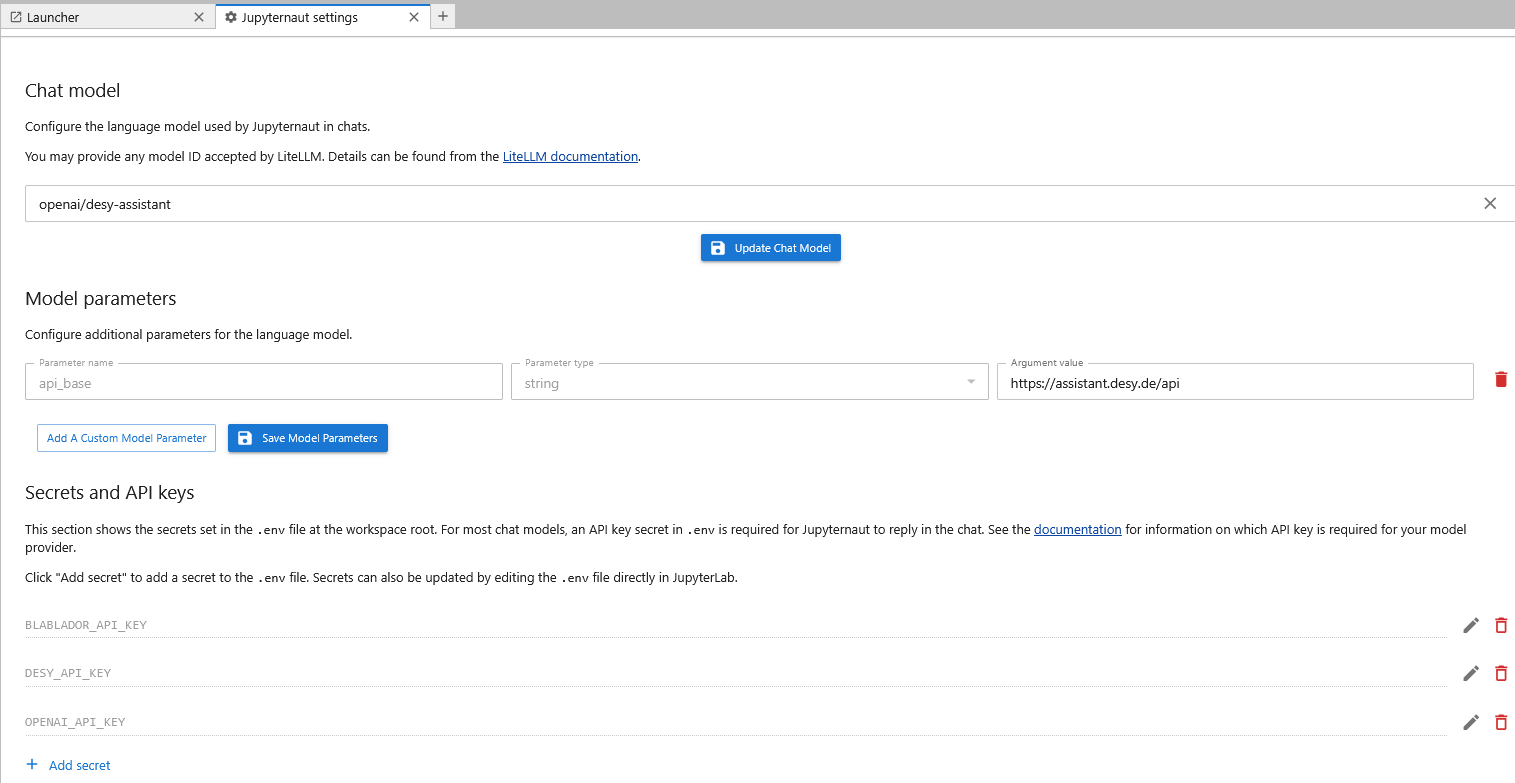
The setup works pretty much the same for any other model provider, like for example blablador.
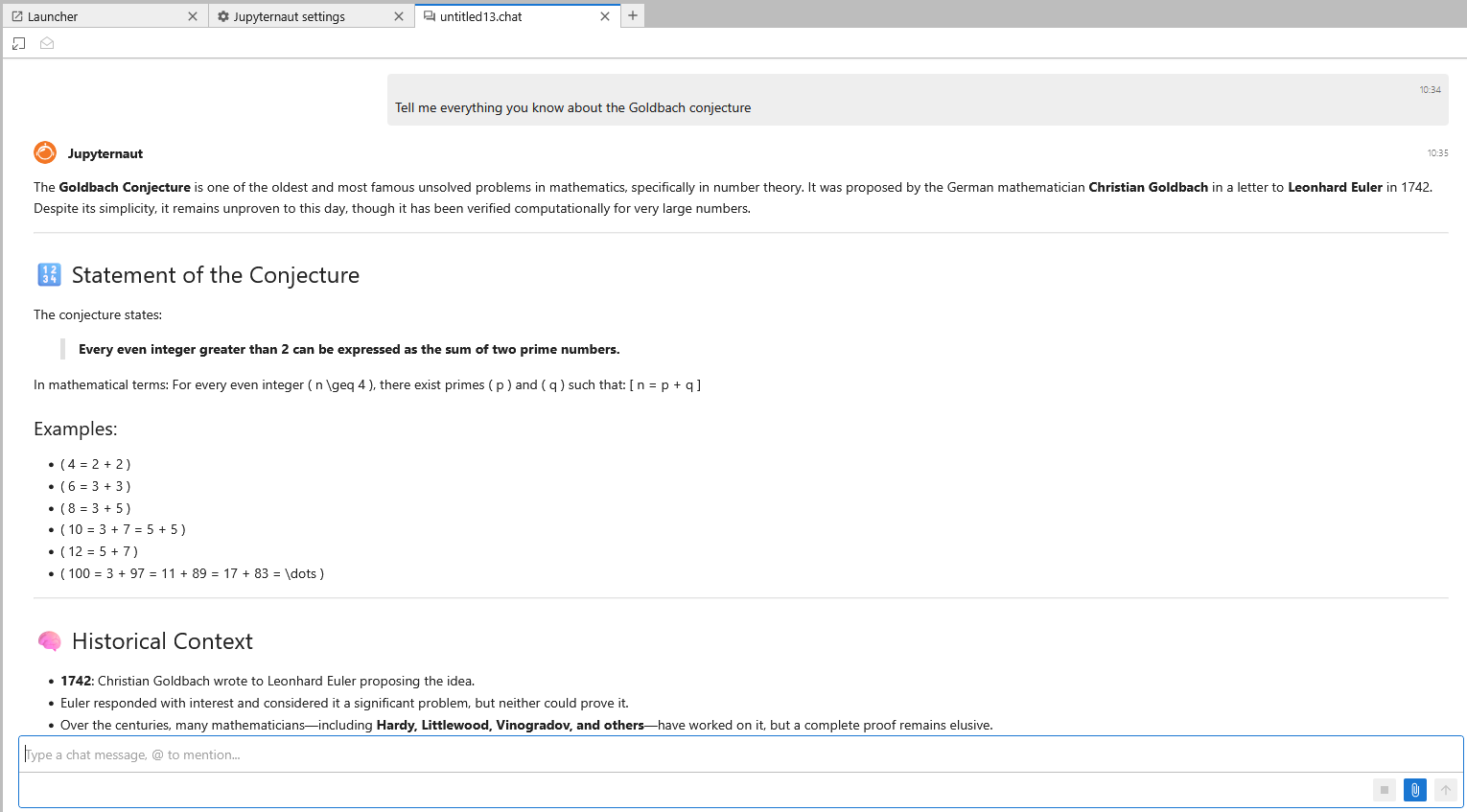
A sample chat:
Configure ai magic
- for the DESY Assistant it looks like this:
%load_ext jupyter_ai_magic_commands
%ai alias desy-code openai/coding --api-base https://assistant.desy.de/api --api-key-name DESY_API_KEY
%%ai desy-code
Can you write me a python code which reads a sqlite table and creates a pandas dataframe from it? Please include error handling.
- for blablador:
%load_ext jupyter_ai_magic_commands
%ai alias blablador-code openai/alias-code --api-base https://api.blablador.fz-juelich.de/v1 --api-key-name BLABLADOR_API_KEY
Registered new alias blablador-code
%%ai blablador-code
Can you write me a python code which reads a sqlite table and creates a pandas dataframe from it? Please include error handling.
Here's a robust Python function that reads a SQLite table into a pandas DataFrame with comprehensive error handling:
import sqlite3
import pandas as pd
import os
from typing import Optional

def sqlite_to_dataframe(
    db_path: str,
    table_name: str,
    columns: Optional[list] = None,
    where_clause: Optional[str] = None,
    params: Optional[tuple] = None
) -> pd.DataFrame:
    """
    Read a SQLite table into a pandas DataFrame.

    Args:
        db_path (str): Path to the SQLite database file
        table_name (str): Name of the table to read
        columns (list, optional): List of column names to select.
                                  If None, selects all columns.
        where_clause (str, optional): WHERE clause condition (without 'WHERE')
        params (tuple, optional): Parameters for the WHERE clause

    Returns:
        pd.DataFrame: DataFrame containing the table data

    Raises:
        FileNotFoundError: If the database file doesn't exist
        ValueError: If table_name is empty or invalid
        sqlite3.Error: For SQLite-specific errors
        Exception: For other unexpected errors
    """
    # Input validation
    if not db_path or not isinstance(db_path, str):
        raise ValueError("db_path must be a non-empty string")

    if not table_name or not isinstance(table_name, str):
        raise ValueError("table_name must be a non-empty string")

    # Check if database file exists
    if not os.path.exists(db_path):
        raise FileNotFoundError(f"Database file not found: {db_path}")

    # Validate columns parameter
    if columns is not None:
        if not isinstance(columns, list) or not all(isinstance(col, str) for col in columns):
            raise ValueError("columns must be a list of strings")

    conn = None
    try:
        # Connect to the database
        conn = sqlite3.connect(db_path)

        # Build the SQL query
        if columns:
            column_list = ", ".join([f'"{col}"' for col in columns])
            query = f"SELECT {column_list} FROM \"{table_name}\""
        else:
            query = f'SELECT * FROM "{table_name}"'

        # Add WHERE clause if provided
        if where_clause:
            query += f" WHERE {where_clause}"

        # Execute query and create DataFrame
        df = pd.read_sql_query(query, conn, params=params)

        return df

    except sqlite3.OperationalError as e:
        error_msg = str(e)
        if "no such table" in error_msg.lower():
            raise ValueError(f"Table '{table_name}' does not exist in the database")
        elif "no such column" in error_msg.lower():
            raise ValueError(f"Column error: {error_msg}")
        else:
            raise sqlite3.Error(f"SQLite operational error: {error_msg}")

    except sqlite3.DatabaseError as e:
        raise sqlite3.Error(f"Database error: {e}")

    except Exception as e:
        raise Exception(f"Unexpected error: {e}")

    finally:
        # Ensure connection is closed even if an error occurs
        if conn:
            conn.close()

# Example usage and demonstration
if __name__ == "__main__":
    # Example 1: Basic usage with a temporary database
    try:
        # Create a temporary database for demonstration
        temp_db = "example.db"
        conn = sqlite3.connect(temp_db)
        cursor = conn.cursor()

        # Create a sample table
        cursor.execute('''
            CREATE TABLE IF NOT EXISTS employees (
                id INTEGER PRIMARY KEY,
                name TEXT NOT NULL,
                department TEXT,
                salary REAL
            )
        ''')

        # Insert sample data
        sample_data = [
            (1, 'Alice', 'Engineering', 75000),
            (2, 'Bob', 'Marketing', 65000),
            (3, 'Charlie', 'Engineering', 80000),
            (4, 'Diana', 'HR', 70000)
        ]

        cursor.execute('DELETE FROM employees')  # Clear existing data
        cursor.executemany('INSERT INTO employees VALUES (?, ?, ?, ?)', sample_data)
        conn.commit()
        conn.close()

        # Read the table into a DataFrame
        print("Example 1: Reading entire table")
        df = sqlite_to_dataframe(temp_db, "employees")
        print(df)
        print(f"\nDataFrame shape: {df.shape}")
        print(f"DataFrame columns: {list(df.columns)}")

        # Example 2: Select specific columns
        print("\n" + "="*50)
        print("Example 2: Reading specific columns")
        df_specific = sqlite_to_dataframe(
            temp_db,
            "employees",
            columns=["name", "department"]
        )
        print(df_specific)

        # Example 3: Read with WHERE clause
        print("\n" + "="*50)
        print("Example 3: Reading with WHERE clause")
        df_filtered = sqlite_to_dataframe(
            temp_db,
            "employees",
            columns=["name", "salary"],
            where_clause="department = ?",
            params=("Engineering",)
        )
        print(df_filtered)

        # Example 4: Error handling demonstration
        print("\n" + "="*50)
        print("Example 4: Error handling")

        # Try to read non-existent table
        try:
            df_error = sqlite_to_dataframe(temp_db, "nonexistent_table")
        except ValueError as e:
            print(f"Caught expected error: {e}")

        # Try to read from non-existent database
        try:
            df_error = sqlite_to_dataframe("nonexistent.db", "employees")
        except FileNotFoundError as e:
            print(f"Caught expected error: {e}")

    finally:
        # Clean up
        if os.path.exists(temp_db):
            os.remove(temp_db)
            print(f"\nCleaned up temporary database: {temp_db}")